Website down, hacked or showing a critical error? Call 07495 384 583

AI · automation · OpenClaw

Practical AI for small businesses, with guardrails

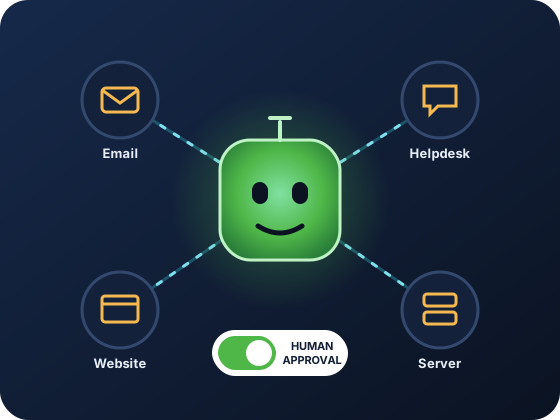
Not another chatbot. We connect AI to the tools you already use (email, helpdesk, website, servers) so it does real work: sorting your inbox, drafting replies, raising tickets, watching your sites and writing first drafts. You stay in control of what it's allowed to do.

Illustration: an AI assistant hub connected to email, helpdesk, website and server icons, with a human approval switch

What we sell

Three ways we help you use AI

1. AI automation with OpenClaw

OpenClaw is an AI gateway and automation engine that we install on a secure server for you, then connect to your email, helpdesk, WordPress and other systems. Think of it as a trained digital assistant that lives inside your business tools, not in someone else's app.

Packages & prices ↓

2. AI on your website

AI-assisted content, smarter contact and enquiry handling, and chat assistants that answer common questions and hand over to a human when they should, built into the WordPress site we host or build for you.

Ask about your site →

3. Advice & setup

Not sure where AI fits? We'll map your repetitive tasks, tell you honestly which are worth automating (and which aren't), and set up the tools safely, including data-protection basics.

Book a free call →

How it's implemented

From idea to working automation in six steps

We don't hand you a login and walk away. We map how your business actually works, then build automations that fit into it.

  1. 1

    Map your workflows

    We look at where time goes: support emails, enquiries, admin, content, monitoring.

  2. 2

    Secure server

    We deploy a secure Linux VPS (Ubuntu or AlmaLinux) that belongs to your business.

  3. 3

    Install OpenClaw

    The gateway is installed, configured and locked down with authentication and monitoring.

  4. 4

    Connect your tools

    Email, helpdesk, WordPress and other APIs are connected, using only the access each task needs.

  5. 5

    Train & set guardrails

    It learns your tone and processes, and gets a written "authority card" of what it may and may not do.

  6. 6

    Go live, carefully

    Automations start with human approval, then earn more freedom as they prove reliable.

Example automations

What AI could do in your business

Typical setups we design. Every business is different, so we'll scope yours on a free call.

Support inbox

An inbox that sorts itself

Before: every morning starts with 60 unread emails and no idea which are urgent.

With AI: each email is read, labelled by urgency and topic, and turned into a ticket, with a suggested reply drafted in your tone. Urgent problems ("my site is down") are flagged to your phone straight away.

Guardrail: replies are drafts until you approve them.

WhatsApp & enquiries

Enquiries answered in minutes, not hours

Before: enquiries arrive by WhatsApp, email and web form, and some get missed.

With AI: common questions (prices, opening hours, "do you cover my area?") get an instant, accurate answer from your own information, and everything else is logged and handed to a person with a summary.

Guardrail: it always says it's an assistant, and never makes promises it can't check.

Websites & servers

A night watchman for your website

Before: you find out your site is down when a customer tells you.

With AI: sites and servers are checked around the clock. Problems are diagnosed from the logs and reported in plain English, and simple, pre-approved fixes (like restarting a failed service) are carried out and logged.

Guardrail: nothing destructive, ever, without a human saying yes.

Content & SEO

First drafts, not blank pages

Before: the blog hasn't been updated since 2023.

With AI: it researches what your customers search for and drafts British-English blog posts, product descriptions and social posts for you to edit.

Guardrail: no invented facts or fake reviews, and nothing is published without your approval.

Online shops

Spot order problems early

Before: a failed payment or stuck order is noticed days later.

With AI: orders are monitored for delays and errors, customer queries about orders get accurate status replies, and product descriptions are drafted from your specs.

Guardrail: refunds and cancellations stay with you.

Admin

The boring bits, handled

Before: hours a week on reminders, summaries and copying information between systems.

With AI: meeting notes summarised, follow-up tasks created, polite payment reminders drafted, and data moved between the tools you already use.

Guardrail: anything sent to a customer is checked first, until you decide otherwise.

Safety first

Every AI we deploy gets an "authority card"

The biggest risk with AI isn't that it's stupid. It's that it's right 98% of the time, so people stop checking the other 2%. That's why every automation we build comes with a written authority card: a short, plain-English list of exactly what it may do on its own, what needs your approval, and what it must never do.

  • Permissions are scoped per system: read-only unless there's a reason
  • Destructive actions (deleting, suspending, emailing customers) need approval
  • Every action is logged, so you can see what it did and why
  • More freedom is earned over time, not handed over on day one
Example authority card
SITE:       yourbusiness.co.uk · production
ACCESS:     WordPress admin (read), server logs (read)

AUTO:       read logs, run health checks,
            draft replies, create tickets
APPROVAL:   updates, config changes, restarts,
            DNS, emailing customers
NEVER:      delete data, disable backups or
            security, expose passwords
EMERGENCY:  smallest reversible fix only,
            then log it and tell a human

OpenClaw packages

AI automation, run on your own server

You get the whole environment designed, deployed and looked after: server, gateway, integrations, security, monitoring and updates.

Starter

£250/month

One or two focused automations

  • VPS deployment
  • Core OpenClaw install
  • Integrations built to your spec
  • All agreed automation flows configured
  • You provide the AI provider API key and pay token costs
Talk about Starter

Enterprise

Custom

Multiple servers and teams

  • Multi-server OpenClaw setup
  • Advanced workflow AI and routing
  • Security hardening and compliance
  • Ongoing management contract
Request a quote

Pricing is indicative. We'll scope your exact use case and confirm a fixed quote before any work begins.

Why not just use ChatGPT?

Chat windows answer questions. Automation does the work.

Generic AI chat tools

  • You copy and paste between the AI and your systems
  • No access to your email, tickets or website
  • Someone still has to do every step
  • Monthly subscription per person

OpenClaw, set up by us

  • Connected directly to your real systems
  • Runs automations, not just conversations
  • Logging and audit trail of every action
  • Runs on a server your business controls

One honest note: the AI model itself usually comes from a provider such as OpenAI (or another of your choice), so the text it processes is sent to that provider. We'll explain the options, including which data should never be sent, before anything goes live.

AI questions

AI automation FAQs

How much does AI automation cost?

OpenClaw Starter is indicatively £250 a month, and Pro starts at £500. On Starter you provide your own AI provider API key and pay its usage (token) costs directly. Smaller website AI and advice jobs are quoted individually. Every project gets a fixed quote before work begins.

Will AI replace my staff?

That's not the aim. The best results come from AI taking over the repetitive parts (sorting, drafting, checking, copying) so your people spend their time on customers and decisions.

Is my data safe?

The OpenClaw gateway runs on a server your business controls, with authentication, logging and scoped access. The AI model provider (for example OpenAI) processes the text sent to it, so we design automations to send only what's needed and keep sensitive data out.

Will customers know they're talking to AI?

Yes. Our assistants say they're assistants and hand over to a person when needed. We don't build AI that pretends to be a human.

Do I need my own server?

For OpenClaw, yes. We set up a secure VPS as part of the package, so you don't need to know anything about servers.

Something broken, slow or worrying you?

Tell us what's happening in your own words. You'll hear back from the person who'll actually fix it.